
Note
Go to the end to download the full example code.
Compute cell volumes on a volume mesh#
This tutorial computes per-cell volumes on a small volume mesh and compares
their sum with PyVista’s total volume. Use this example when you want the
simplest geometry calculation on a TensorMesh.
Imports#
import numpy as np
import pyvista as pv
import torch

import graphlow
Step 1: Build a small volume mesh#
def make_volume_grid() -> pv.UnstructuredGrid:
    """Create a small warped hexahedral grid."""
    x = np.array([0.0, 1.0, 2.2, 3.5], dtype=np.float32)
    y = np.array([0.0, 0.8, 1.7], dtype=np.float32)
    z = np.array([0.0, 0.6, 1.4], dtype=np.float32)
    X, Y, Z = np.meshgrid(x, y, z, indexing="ij")
    Z = Z + 0.12 * X * Y
    grid = pv.StructuredGrid(X, Y, Z)
    return grid.cast_to_unstructured_grid()
Step 2: Compute cell volumes#
def main() -> None:
    """Run the tutorial."""
    mesh = graphlow.from_pyvista(make_volume_grid(), backend="torch")
    cell_volumes = mesh.geometry.cell_volumes()
    total_volume = torch.sum(cell_volumes).item()

    print(f"Cell volume tensor shape: {tuple(cell_volumes.shape)}")
    print(f"First four cell volumes: {cell_volumes[:4, 0].tolist()}")
    print(f"Total volume from graphlow: {total_volume:.6f}")
    print(f"Total volume from PyVista: {mesh.pvmesh.volume:.6f}")

    mesh.cell_data["cell_volume"] = cell_volumes
    mesh.copy_features_to_pyvista()

    plotter = pv.Plotter(window_size=[800, 600])
    plotter.add_mesh(
        mesh.pvmesh,
        scalars="cell_volume",
        show_edges=True,
        cmap="viridis",
    )
    plotter.show_bounds(mesh=mesh.pvmesh, location="outer")
    plotter.camera_position = "iso"
    plotter.show()


if __name__ == "__main__":
    main()
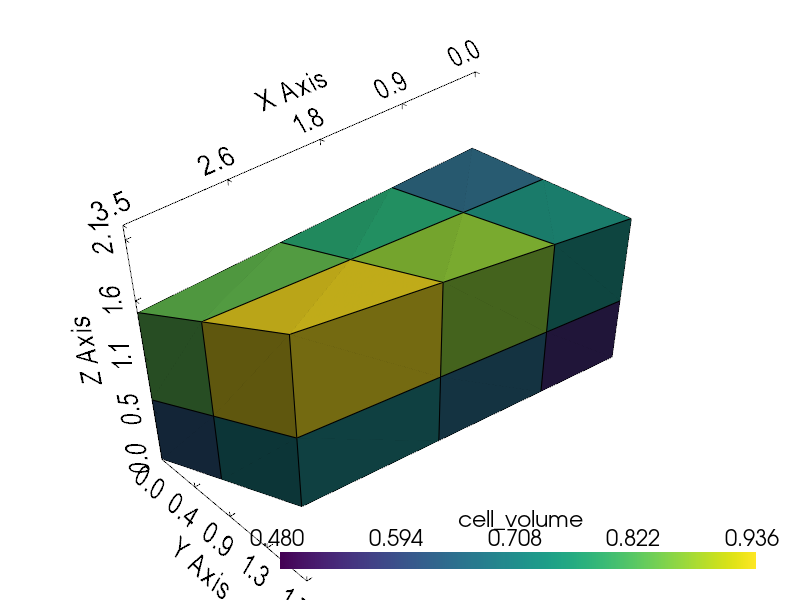
/home/runner/work/graphlow/graphlow/src/graphlow/core/topology.py:108: PyVistaDeprecationWarning: `UnstructuredGrid.offset` is deprecated. Use `UnstructuredGrid.cell_offsets` instead.
  return self._mesh.pvmesh.offset
Cell volume tensor shape: (12, 1)
First four cell volumes: [0.4800001084804535, 0.5760000348091125, 0.6240000128746033, 0.5400000214576721]
Total volume from graphlow: 8.330000
Total volume from PyVista: 8.330000
Total running time of the script: (0 minutes 0.368 seconds)