Note
Go to the end to download the full example code.
Extract a boundary surface from a volume mesh#
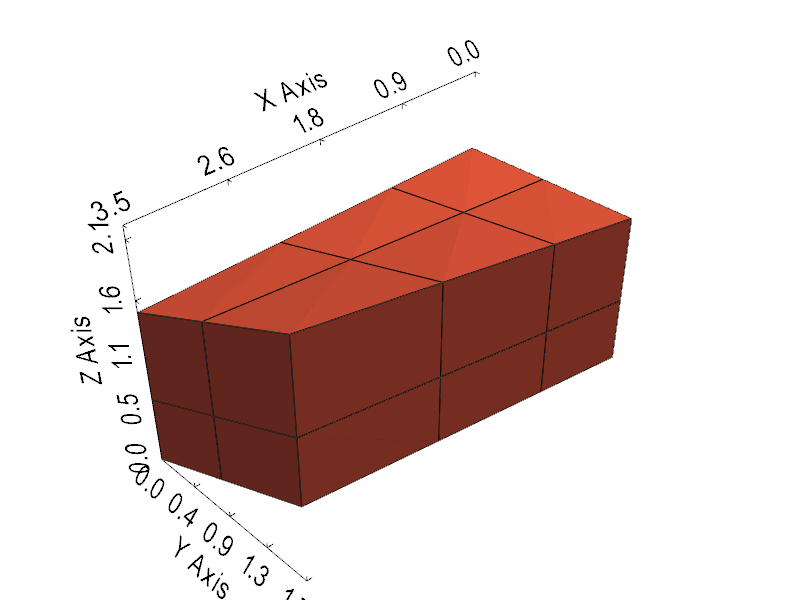
This tutorial extracts the boundary surface of a volume mesh and shows that the surface points keep their connection to the parent volume points by default.
Imports#
import numpy as np
import pyvista as pv

import graphlow
Step 1: Build a small volume mesh#
def make_volume_grid() -> pv.UnstructuredGrid:
    """Create a small warped hexahedral grid."""
    x = np.array([0.0, 1.0, 2.2, 3.5], dtype=np.float32)
    y = np.array([0.0, 0.8, 1.7], dtype=np.float32)
    z = np.array([0.0, 0.6, 1.4], dtype=np.float32)
    X, Y, Z = np.meshgrid(x, y, z, indexing="ij")
    Z = Z + 0.12 * X * Y
    grid = pv.StructuredGrid(X, Y, Z)
    return grid.cast_to_unstructured_grid()
Step 2: Extract the surface#
def main() -> None:
    """Run the tutorial."""
    mesh = graphlow.from_pyvista(make_volume_grid(), backend="torch")
    mesh.requires_grad(True)

    surface = mesh.extract_surface()
    surface_area = surface.geometry.face_areas().sum()
    surface_area.backward()

    print(f"Volume mesh dimension: {mesh.topology.mesh_dim().name}")
    print(f"Surface mesh dimension: {surface.topology.mesh_dim().name}")
    print(f"Volume points / cells: {mesh.n_points} / {mesh.n_cells}")
    print(f"Surface points / cells: {surface.n_points} / {surface.n_cells}")
    print(f"Gradient reached the volume points: {mesh.points.grad is not None}")

    plotter = pv.Plotter(window_size=[800, 600])
    plotter.add_mesh(mesh.pvmesh, style="wireframe", color="gray", opacity=0.3)
    plotter.add_mesh(surface.pvmesh, show_edges=True, color="tomato")
    plotter.show_bounds(mesh=mesh.pvmesh, location="outer")
    plotter.camera_position = "iso"
    plotter.show()


if __name__ == "__main__":
    main()
/home/runner/work/graphlow/graphlow/src/graphlow/core/topology.py:108: PyVistaDeprecationWarning: `UnstructuredGrid.offset` is deprecated. Use `UnstructuredGrid.cell_offsets` instead.
  return self._mesh.pvmesh.offset
Volume mesh dimension: VOLUME
Surface mesh dimension: SURFACE
Volume points / cells: 36 / 12
Surface points / cells: 34 / 32
Gradient reached the volume points: True
Total running time of the script: (0 minutes 0.261 seconds)