Note
Go to the end to download the full example code.
Create a TensorMesh from a PyVista mesh#
This tutorial shows the first step in most graphlow workflows:
build a small PyVista volume mesh, convert it to TensorMesh, and inspect
the basic mesh information exposed by the geometry/topology wrappers.
Imports#
import numpy as np
import pyvista as pv

import graphlow
Step 1: Build a small volume mesh#
Keep the same mesh family across the beginner tutorials so the API changes are easier to see than the input data changes.
def make_volume_grid() -> pv.UnstructuredGrid:
    """Create a small warped hexahedral grid."""
    x = np.array([0.0, 1.0, 2.2, 3.5], dtype=np.float32)
    y = np.array([0.0, 0.8, 1.7], dtype=np.float32)
    z = np.array([0.0, 0.6, 1.4], dtype=np.float32)
    X, Y, Z = np.meshgrid(x, y, z, indexing="ij")
    Z = Z + 0.12 * X * Y
    grid = pv.StructuredGrid(X, Y, Z)
    return grid.cast_to_unstructured_grid()
Step 2: Convert to TensorMesh#
def main() -> None:
    """Run the tutorial."""
    pv_mesh = make_volume_grid()
    mesh = graphlow.from_pyvista(pv_mesh, backend="torch")

    cell_types = [
        pv.CellType(int(cell_type)).name
        for cell_type in mesh.topology.unique_cell_types()
    ]

    print(f"Backend tensor type: {type(mesh.points).__name__}")
    print(f"Number of points: {mesh.n_points}")
    print(f"Number of cells: {mesh.n_cells}")
    print(f"Topological dimension: {mesh.topology.mesh_dim().name}")
    print(f"Cell types: {cell_types}")
    print(f"Point tensor shape: {tuple(mesh.points.shape)}")

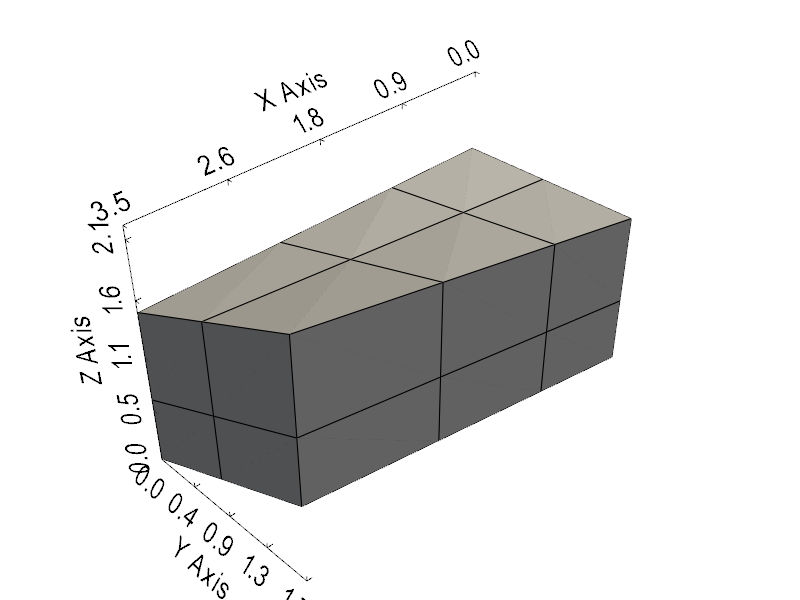
    plotter = pv.Plotter(window_size=[800, 600])
    plotter.add_mesh(mesh.pvmesh, show_edges=True, color="lightgray")
    plotter.show_bounds(mesh=mesh.pvmesh, location="outer")
    plotter.camera_position = "iso"
    plotter.show()


if __name__ == "__main__":
    main()
Backend tensor type: Tensor
Number of points: 36
Number of cells: 12
Topological dimension: VOLUME
Cell types: ['HEXAHEDRON']
Point tensor shape: (36, 3)
Total running time of the script: (0 minutes 4.611 seconds)